Why can't I add any add-ons in my customer account?
Add-ons such as Skip-Ad, extra recording storage or mySports can only be added to the current Teleboy TV subscription. This applies to all add-ons.
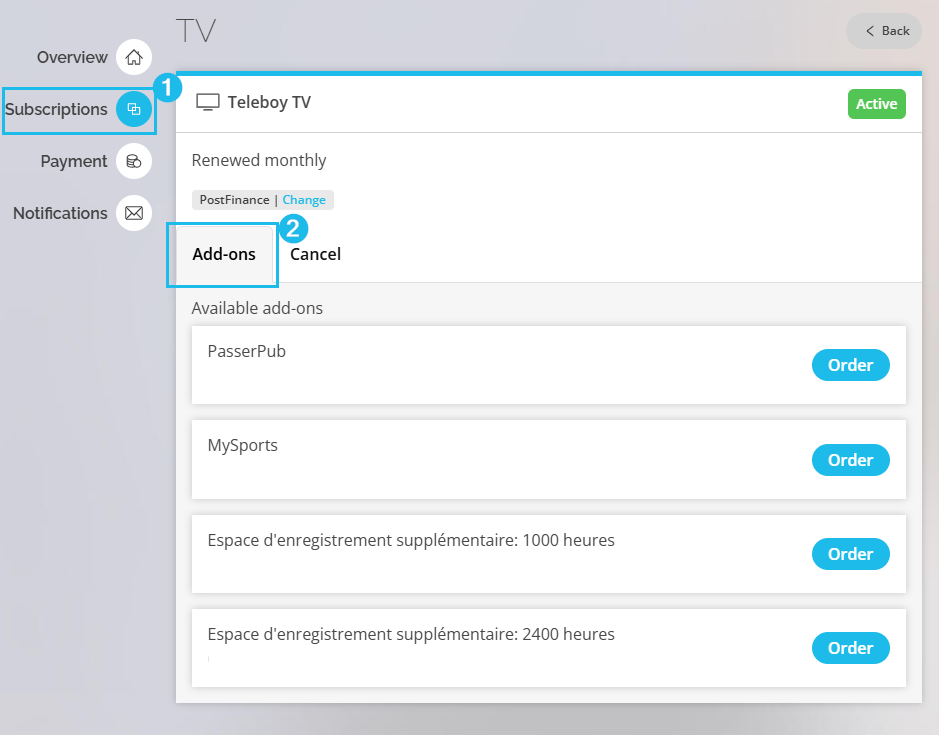
Short answer: If you still have an older TV subscription such as Teleboy Plus, Comfort, MAX or Teleboy TV+, you cannot add any add-ons. First switch to Teleboy TV in your customer account or in your Apple App Store. You will then find all add-ons in the «Add-Ons» tab.
ℹ Which subscriptions are affected?
With the older subscriptions Teleboy Plus, Teleboy Comfort, Teleboy MAX and Teleboy TV+, no add-ons can be booked. Teleboy no longer offers these subscriptions. There are no add-ons with Teleboy Free either.
How to switch to Teleboy TV and add add-ons
1Open your customer account
Log in and open my.teleboy.ch/service/tv.
2Switch to the Teleboy TV subscription
Select the Teleboy TV subscription and confirm the switch. Your current subscription will be changed to Teleboy TV.
3Order the add-on in the «Add-Ons» tab
After the switch, you will find the «Add-Ons» tab under my.teleboy.ch/service/tv. Choose the add-on you want and order it.
⚠ Do you have Teleboy MAX or Teleboy TV+?
Skip-Ad was included in these subscriptions. Teleboy TV does not include Skip-Ad automatically. If you want to keep using Skip-Ad, add it in the «Add-Ons» tab after the switch.
Related articles
Was this article helpful?
That’s Great!
Thank you for your feedback
Sorry! We couldn't be helpful
Thank you for your feedback
Feedback sent
We appreciate your effort and will try to fix the article