Setting up the «Clear Speech» function
Since 2022, some broadcasters have offered the «Clear Speech» function. You can activate this option directly in the Teleboy TV player.
Quick answer: In the player, click the cogwheel → Audio Track → select «mis» or «mus».
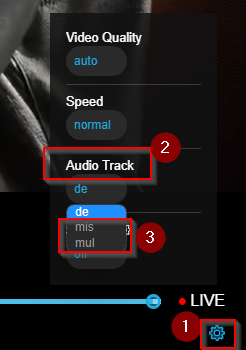
How to proceed
1What is «Clear Speech»?
An AI converts the standard stereo audio track into a speech-optimised track: dialogues are highlighted, background noise and music are automatically reduced. Ideal for people who want to understand dialogue more clearly.
2Activate the function
Open the player and click the cogwheel → Audio Track → select «mis» or «mus».
3Channels supporting «Clear Speech»
Currently available on: Das Erste, ZDF, NDR, WDR, RBB Brandenburg, BR Süd, HR, MDR, SWR Baden-Württemberg, SR, Radio Bremen. More broadcasters to follow.
ℹ Note
Broadcasters regularly change the name of this audio track. It often appears as «mus», «mis» or other unknown abbreviations in the audio selection.
✓ Done!
«Clear Speech» is activated – dialogues are now reproduced more distinctly.
Was this article helpful?
That’s Great!
Thank you for your feedback
Sorry! We couldn't be helpful
Thank you for your feedback
Feedback sent
We appreciate your effort and will try to fix the article